HOW TO VALIDATE A CORPORATE ACTION
From the Main CATS screen
Select the Search menu.
Select Validate CAs.
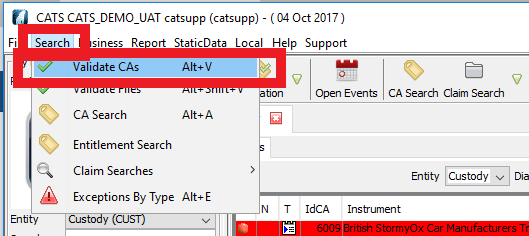
The Validation CAs screen will be displayed as below, for you to Validate CAs.

The procedure is the same as described in HOW TO VALIDATE A CORPORATE ACTION in the CA EVENT CAPTURE AND CLEANSING section of the manual.
HOW TO VALIDATE A FILE
From the Main CATS Screen
Select the Search menu.
Select Validate Files.

The Validation Files screen will be displayed as below, for you to Validate Files.

HOW TO ACCESS THE NEW CORPORATE ACTION SEARCH SCREEN
From the Main CATS Screen
Select the Search menu.
Select CA Search.

The New Corporate Action Search screen will be displayed, as below.

The procedure is the same as described in HOW TO SEARCH A CORPORATE ACTION in the CA EVENT CAPTURE AND CLEANSING section of the manual.
HOW TO SEARCH FOR AN ENTITLEMENT
From the Main CATS Screen
Select the Search menu.
Select Entitlement Search.

The New Corporate Action Search screen will be displayed, as below.
The procedure is the same as described in HOW TO SEARCH A CORPORATE ACTION in the CA EVENT CAPTURE AND CLEANSING section of the manual.
Company Confidential
