
How to Log Into Deutsche Bank
Open Internet Explorer.
Enter the link https://dbrasweb-ext.db.com/.
Deutsche Bank dbrasweb for Externals screen appears.
Select London.
Select Login.
Dbras login name.
Enter Username: name.name@db.com.
Obtain the 8 digit number.
Enter password: 300668.
Select the RSA Token app.
Enter PIN: 1004.
Click and your 8 digit number will appear (make sure that it has 60 seconds left).
Secure ID Passcode.
Enter 8 digit code from RSA Token.
Click Sign In.
Loading Components will appear.
Message Box OK.
Click Box Launch dbGroup UA.
Log on
Enter Username: _________.
Enter Password: _________.
Log on to: DBG (This will automatically fill itself).
Click Login.
A box appears with text in, then another box appears with text in.
Click UK-LON.
Click Connect.
This should then give you access into DB.
If the program doesn't run then open download Citrix Receiever, using the link
https://www.citrix.com/downloads/citrix-receiver/windows/receiver-for-windows-latest.html.
Then close down Internet Explorer and restart.
In the DB machine open Internet Explorer.
Select Favourites .
Select Deutsche Bank CATS.
This will then allow you to select either.
Agency Lending (AGL) and Fixed Income (FI)- (Global Markets London/Global Markets Frankfurt) or
International Prime Brokerage (IPB)
When the specific CATS system opens.
Enter DBras username and password into the specific boxes.
Click Launch.
Finding the CA File Entity
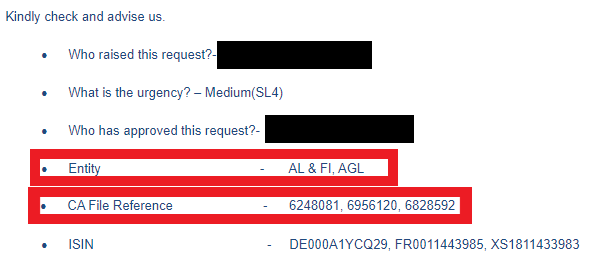
From the support request sent by email.
Find the Entity.
Find the CA File Reference.
Company Confidential
